Using Expo OTA updates on POS terminals
While working on the POS apps I’ve been building, I realized I had been making releases harder than they needed to be.
For a long time, my process was basically: build the APK, move it to the POS terminal, install it, test, repeat. Even small changes meant rebuilding and reinstalling the entire app.
I had always thought of over-the-air updates as something mainly used for mobile apps on regular phones. I never really considered how useful they could be for POS terminals sitting in the field.
Then one evening, while going through the Expo docs on OTA updates, I finally understood how it actually works. An OTA update is essentially a new JavaScript bundle that the app can download and apply without replacing the native binary. The terminal doesn’t need the Play Store. It just needs to already have a build that includes expo-updates and is configured to receive updates.
That changed how I approached the whole release process. I updated my eas.json setup with separate profiles for the different POS architectures: armeabi-v7a for some of the older terminals and arm64-v8a for the newer ones, and gave each profile its own update channel.
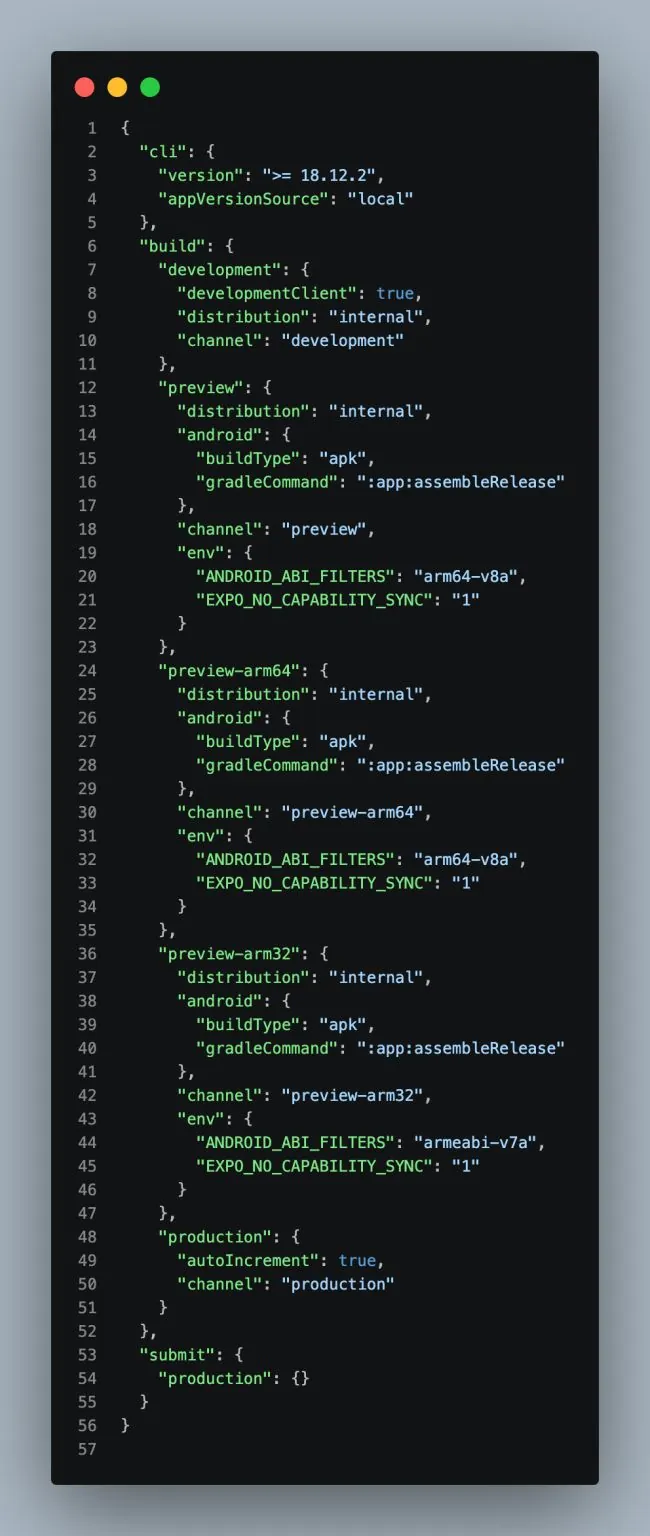
Now, when I need to push a JavaScript-side fix, I don’t need to rebuild and reinstall the APK. I can publish an update, and the terminal picks it up when the app launches.
What I found interesting wasn’t just getting OTA updates working. It made me understand Expo’s update system and the difference between the native binary and the JavaScript layer a lot better.
I had spent so much time working around a limitation that wasn’t actually there.
Originally shared on LinkedIn.